Stage Player
Your backing tracks and sound effects, fired from the phone in your pocket.
A pad plays a file when you tap it. Whether that file is a bass line, a click for the drummer or a thunderclap is up to you. The trim, the level, the count-in, the fade, the song that follows this one, the words and the chart that come up by themselves: all of that is prepared at home, days before the gig. On stage it collapses into one gesture.
Free, no ads. An account only buys cloud storage.


A music player is not a stage player
- It streams
Basements have no signal and festival wifi collapses exactly when the room fills up. Stage Player copies every file onto the phone, so airplane mode is the right way to play a gig.
- Everything is a tap away from being changed
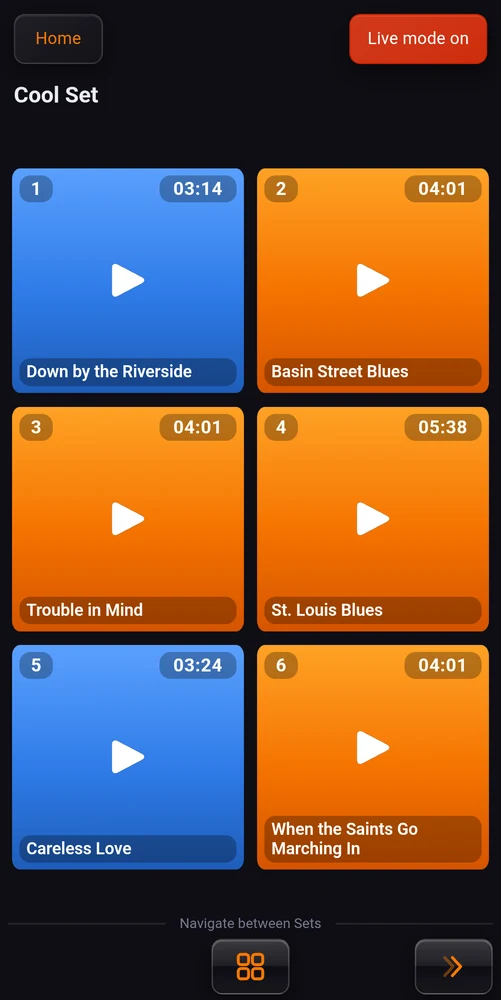
Live mode takes it all away: no edit button, no grid sizes, no backups, no account, no seek bar. The pads, and nothing else.
- The track comes in a beat late
Most exports open with a fraction of a second of nothing, which on stage reads as a pad that did not fire. Trim the front off in the app and the tap and the downbeat become the same moment.
- The same song, set up three times
A recording can live in a shared library instead. Trim it once, mix it once, attach its chart once, and every set that plays it follows.
Deep to prepare, bare to play
The settings are deep because preparation is where you have time. The stage view is bare because that is where you do not. You tap a pad, it plays, and everything you decided weeks ago happens on its own.
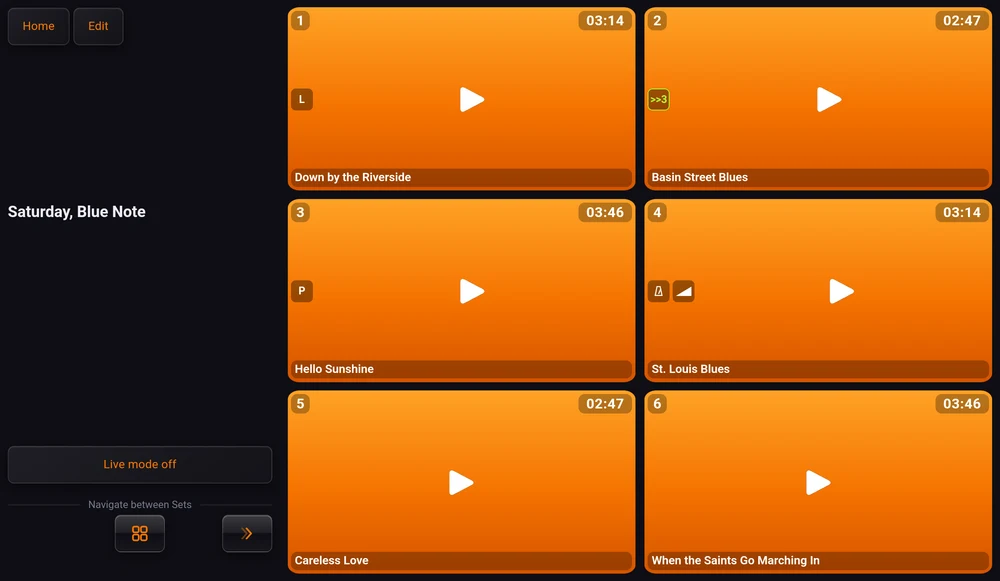
Portrait or landscape, and the grid keeps its shape in play mode, in edit mode and in live mode. The pad at the bottom right in rehearsal is the pad at the bottom right on stage.
What it does
All of it free. Signing in buys cloud storage, and nothing you need on stage sits behind it.
Pads
Tap a pad and it plays. A Music pad replaces the track that was running. A Sound Fx pad sits on top of it, and several can sound at once.
Live mode
It works by taking things away. Editing, backups, the account, the pad badges and the seek bar all go for the length of the gig.
Sets
A grid of 6, 9, 12 or 15 pads, one per show or one per act. Drag the songs into order, and step between sets from the stage.
Chained play
One song hands over to the next with up to 20 seconds of silence in between. The chain can point into another set, and the app follows it there.
Count-ins
One to twelve clicks at the track's own tempo, in your ears, on the screen as a number, or both. The band comes in one beat after the last click.
Level and fades
A level per pad, from 0 to 200%, set by ear while the song plays. Fades in and out to 20 seconds, and the fade-out starts by itself.
Trimming
Mark where a track starts and ends on a zoomable waveform, to a hundredth of a second. Your original file is never touched.
Shared library
One recording, any number of sets. No second copy on the phone, no second upload to the cloud, and each set still keeps its own level.
Lyrics
Words that scroll themselves, written in plain text or light Markdown, with time marks you place while the track plays.
Chord charts
Written on the phone, bar by bar. The app knows where every bar is, so the chart follows the track from the first play and scrolls by the line, not by the page.
PDF scores
A chord chart or a part, cropped to lose the margins, turning its own pages at the moments you marked.
Split audio
Two files in one pad, a click in one ear and the band in the other, assembled into a single stream so they cannot drift apart.
MIDI at start
A program change on the channels you choose when a pad starts, so the keyboard is already on the right sound at the downbeat. USB, no account needed.
Cloud backups
Sets, songs, lyrics and scores kept off the phone, with a version history ten deep, restorable onto a new one in a few taps.
Nothing left to tap by mistake
Switch it on before you walk out, and the app puts everything you cannot possibly want mid-set out of reach: the edit button and the pad settings behind it, the grid sizes, the cloud screens, the account, the library card.
The pad badges go too. Out of live mode a pad carries little marks saying it is chained, that it has a count-in, that it will throw lyrics on screen. Those are notes you wrote to yourself while preparing. On stage a pad says what it is and whether it is playing, and its name gets the room back.
The screen stays awake the whole time the app is in the foreground, live mode or not. Airplane mode and Do Not Disturb are still yours to switch on: Android does not let an app force either.

A grid you build at home
A set is one show, or one part of one. Choose 6, 9, 12 or 15 pads and they fill the screen, so fewer pads means bigger targets: six of them for a cue list you have to hit in the dark, fifteen for a long covers set you would rather not scroll.
Reordering is a vertical list with a handle on every row, empty slots included, so a gap can be pushed to the end of the show rather than left in the middle of it. Shrinking a set hides the extra pads and never deletes anything.
Most people end up with three or four small sets rather than one big one, by mood or by function, and move between them with the arrows at the foot of the grid.


A run of songs that plays itself
Point a pad at the slot that should follow it, and hold up to 20 seconds of silence in between: nothing, to run two songs together, or three or four seconds to say something to the room without the next track arriving over the top of it.
The chain fires when the track reaches its end, and only then. Stopping the pad yourself is you ending the song, which is a different act from the song finishing, so nothing follows it. A set can also chain into a different set, and the app follows the music there with the next song already playing.

Ready before the downbeat
One to twelve clicks, at the tempo of the track rather than a tempo that is comfortable to count. In your ears, or as a big number on the screen for when the click cannot be in the monitors, counting up or down. The music comes in on the beat after the last click, the way a drummer counts a band in.
A fade-in applies every time the song starts, including when you pick a paused one back up. A fade-out starts on its own: the app watches the time remaining, and when there is less of it left than the fade is long, it begins. A long track gets brought down and handed to the next one without anybody counting bars.

The tap and the downbeat, one moment
Mark where the music actually starts and ends on the waveform, or type them in as seconds, to two decimals. The zoom goes far enough to put a marker on a beat rather than roughly, and the play button auditions the region before you keep it.
Nothing is written back to your file, so the original export stays exactly as it was. And a trim that is cutting thirty seconds off a song cannot hide behind a switch you turned off months ago: once a boundary has moved, the app keeps saying so.

Own a song once, not three times
The same backing track sits in the pub set, the wedding set and the acoustic set, and it is the same recording every time. Put it in the library and every set points at it: its boundaries, its mix, its lyrics and its chart live in one place, and changing one of them changes it everywhere at once.
What is shared is the recording. Each pad keeps its own type, its own level, its own count-in and its own chaining, so the same song can be a hard cut in one set and a chained segue in another. A pad's colour says which it is: orange owns its file, blue plays a library title.
The file lives on the phone once instead of three times, and backing the library up costs no credit.


Words that follow the music
Type them, paste them, or import a text file. With no marks at all the whole text scrolls evenly from top to bottom over the length of the song, which on most songs is already enough. A mark pins one line to one moment, so four or five of them, one per section, is a whole song done.
You place a mark by playing the track in the editor and tapping the button showing the running time when the section arrives. On stage the marks are invisible. Drag the text with a finger and you take over; one tap hands the scrolling back.
Plain text works as it is. Headings, bold, bullets and a quote line are there if you want them: the quote gets an orange bar down its side, which makes it the right place for a note to yourself rather than something you sing.
Chords go over the words too, if the song needs them. Tap a word, pick the chord, and it sits above it on stage in blue, orange, yellow or white, at whatever size you can read under your own lights. Hold a word to cut it into syllables, or to open a space for a chord that falls between two words.

A grid, and the words under it
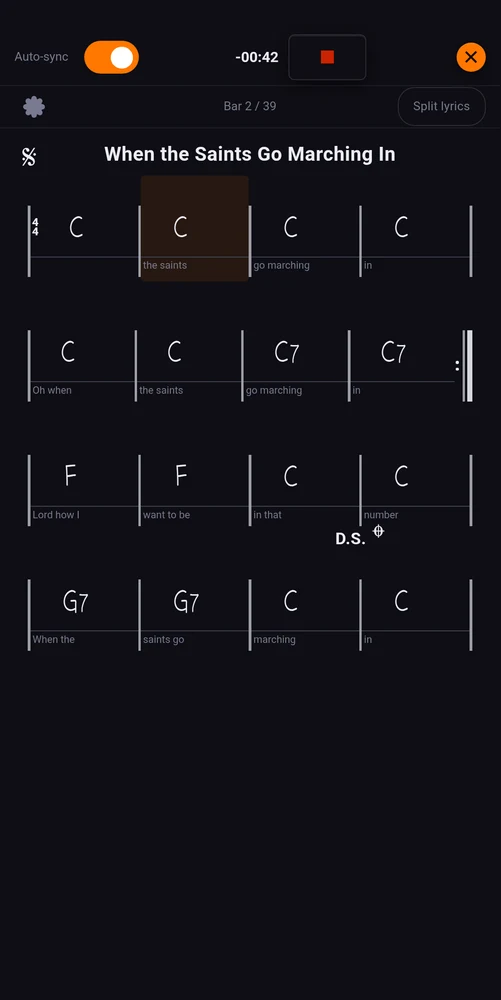
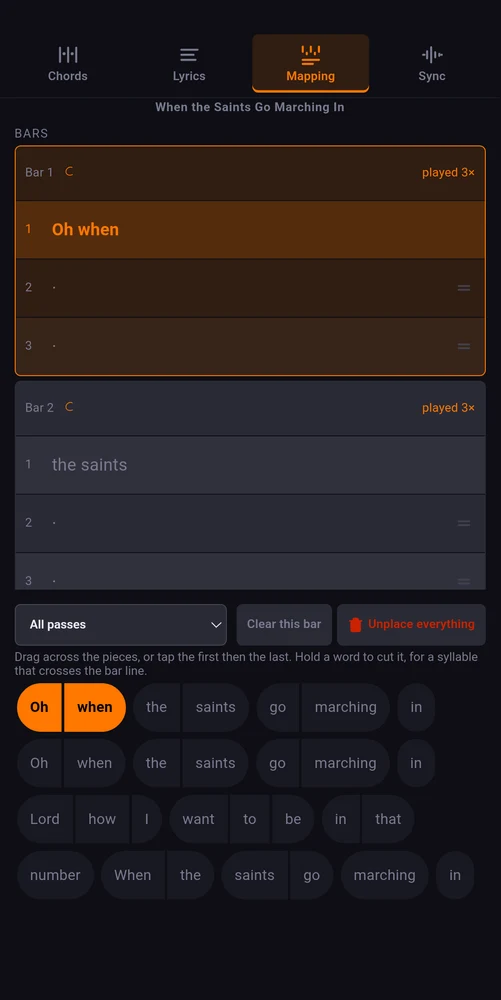
For the players who want more than a lyric sheet: a real chart, written on the phone, locked to the track that plays it. Bars four to a line, the chord picker one tap deep, repeat marks, second endings, segno, coda, D.S. and D.C. The grid unfolds the jumps itself, so bar 31 of the chart is bar 31 of the song.
Then the words go under the bars they are sung over. Drag across a line to drop it on the bars, hold a word to cut it where a syllable crosses a bar line, and a verse that repeats with one line changed does not get typed twice. A chorus played three times says so, and each pass can keep its own words.
On stage the chart follows the track like everything else: the current bar is lit, the page moves itself, and the whole thing exports to PDF if you would rather have it on paper.
The score you already have, attached in a minute
Most players already have their charts: a PDF from the band's folder, a part from the arranger, a scan of the page they have read for years. Attach it to the song and it gets everything the rest of the app has, without retyping a note of it.
Import a chord chart, a part or a scan. Crop the margins away once for the whole document, rotate it if it was exported on its side, and the pages get drawn in the background while the set sits idle, so a turn never waits on the phone.
A marker says one thing: at this moment, be on this page, at this height. Place a few and the app works out the rest, then tells you the times the pages will actually appear, so you can move a turn that would have landed halfway through a phrase.
If there is no chart yet, write one in the app itself, or let Chord Analyser build it on the phone and export the PDF, free.

A click in one ear, the band in the other
One pad, two files, each with its own level and its own trim: the click and the guide vocal to the drummer's in-ears, the backing track to the room, from a single phone.
The two are assembled into one stereo stream on the phone, one source per channel. Because there is only one stream, there is nothing to keep in step and the two cannot drift. Playing two files in two players sounds like the obvious answer and it is the wrong one: the gap between their starts is never the same twice, and a click flamming against the band by 30 ms is unusable.
If the two exports do not begin at the same point, the aligner draws both waveforms on one time scale so you drag one onto the other and hear the result as you go.


Work that outlives the phone
A phone gets dropped off the front of a stage, or stolen at a service station. The evening you spent trimming intros by ear, and the running order you settled on after three rehearsals, live nowhere else. Sign in and they live somewhere else too: the audio, the lyrics and the scores, ready to come back down onto a new phone.
Every save pushes the previous one into a history rather than overwriting it, and a set keeps its last ten. Going back a version is an ordinary thing to do, not an emergency measure: you cut a song you now want back, or you tightened a fade too far.
Nothing touches the network while a song is playing in live mode, and the backup screens are not even reachable there.


The whole app, written down
Every switch, slider and button, explained the way you would explain it at a rehearsal. Ten pages, no login, and it reads on a phone.
Screen by screen
Nothing on stage is behind a paywall
The app is free and has no ads. Signing in adds cloud backups, and the first set you keep up there costs nothing.
 Download on Google Play