Why multiple launch points create real problems
When only one person triggers sound effects, the setup is straightforward: one device, one operator, one audio output. The moment you distribute triggering across several performers, you introduce a set of coordination challenges that many bands underestimate.
- Who has the master control? If one device manages all sounds, other performers depend on that one person - which defeats the purpose of distributed triggering.
- How do you synchronize configuration? If each performer has their own device, how do you ensure they all have the same sounds, volumes and assignments?
- How do you route audio centrally? Multiple devices outputting audio independently creates a mixing nightmare at the front-of-house console.
There are two fundamentally different approaches to solving this: MIDI infrastructure, or distributed smartphone apps. Each has genuine advantages and genuine limitations.
Approach 1 - MIDI infrastructure
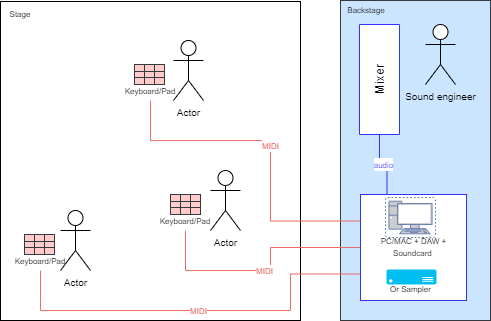
In a MIDI-based setup, multiple trigger devices (pads, buttons, footswitches) connect to a central computer or hardware sampler, which manages all audio output from a single point.
How it works
Each trigger device sends MIDI messages to the central unit. The central unit interprets those messages and fires the corresponding audio clip. MIDI channels allow you to differentiate between performers: each person's controller is set to a different channel, giving the central system full visibility over who triggered what.
Advantages
- All audio comes from a single output - clean, consistent, easy to manage at the mixer
- Professional-grade equipment with high reliability
- Possible to route separate monitor and FOH mixes
- Each performer's trigger can be completely independent
Disadvantages
- Significant cost (MIDI controllers, audio interface, software, cabling)
- Complex setup and configuration - not a solution you improvise
- Requires cable runs between each performer and the central device
- Low discretion: MIDI hardware is often visible and bulky on stage
- A central point of failure: if the main computer or sampler fails, all audio stops
Approach 2 - Distributed smartphone apps
Each performer carries a smartphone loaded with a dedicated live audio app. Every device has its own audio output, which feeds into the house PA or a personal monitor directly.
How it works with Stage Player
Stage Player's cloud sync feature allows all performers to share the same configuration from a central source. When the setup is updated, all devices pull the latest version - ensuring everyone has identical sounds, volumes and pad assignments.
Each performer then operates their own device independently. There's no central computer or MIDI routing to manage. Audio goes directly from each phone to the PA or to a small mixer at the side of the stage.
Setting up Stage Player for multi-device use
A few practical tips for making this work smoothly:
- Classify your files carefully. Use Stage Player's distinction between "Music" (backing tracks) and "Sound FX" (short clips) to control how sounds are sequenced and chained. A sound effect shouldn't trigger the next track automatically.
- Calibrate volume per device. Each phone has slightly different output levels. Spend time at soundcheck leveling each device to 80% volume, then fine-tune individually. Store volume settings per file, not globally.
- Use shared cloud configurations. The person responsible for the setlist maintains the master configuration, which syncs to all other devices. This prevents each performer from accidentally diverging from the planned setlist.
- Enable Live Mode on every device. This prevents sleep, silences incoming calls and drops the ringtone volume - essential for a phone being used on stage.
Advantages
- Zero additional hardware investment beyond a device each performer likely already owns
- Compact and discreet - a phone is invisible on stage
- Simple to set up and modify - changes sync via the cloud
- No cable runs between positions
- Wireless triggering possible via Bluetooth
Disadvantages
- Each device has a separate audio output - requires individual connections to the PA or mixer
- No dual audio routing (you can't simultaneously send click track to monitors and backing to FOH)
- Less suitable for complex, high-volume professional setups
Which approach is right for you?
The honest answer depends heavily on your context. Here's a simple way to think about it:
- If you perform regularly, have a consistent band, and can invest in the setup - MIDI infrastructure will give you the most professional, reliable result.
- If you perform occasionally, work with different configurations, or need to keep costs and setup time low - distributed smartphones with Stage Player is a practical, effective solution that most bands can implement in an afternoon.
- If you need dual audio routing for a click track - smartphones alone won't do it. You need at least a laptop with Ableton or dedicated hardware.
The best setup is the one you'll actually use reliably under pressure. Technical sophistication counts for nothing if you're troubleshooting MIDI routing at the soundcheck when the venue opens its doors.
Stage Player for multi-device setups
Stage Player's cloud sync was designed specifically for bands that need multiple devices to share a single configuration. Free, no ads.
Discover Stage Player